Your plan gives you unlimited clients, invoices, accounting, documents, tasks and the client portal. Only two things are counted each month: AML screenings and e-signatures. This guide explains how that counting works and how to add more when you need it.
See this month's usage
- Log in to your workspace.
- In the left menu, under Admin, click Usage and top-ups.
- The This month's usage section shows two meters: AML screenings and E-signatures.
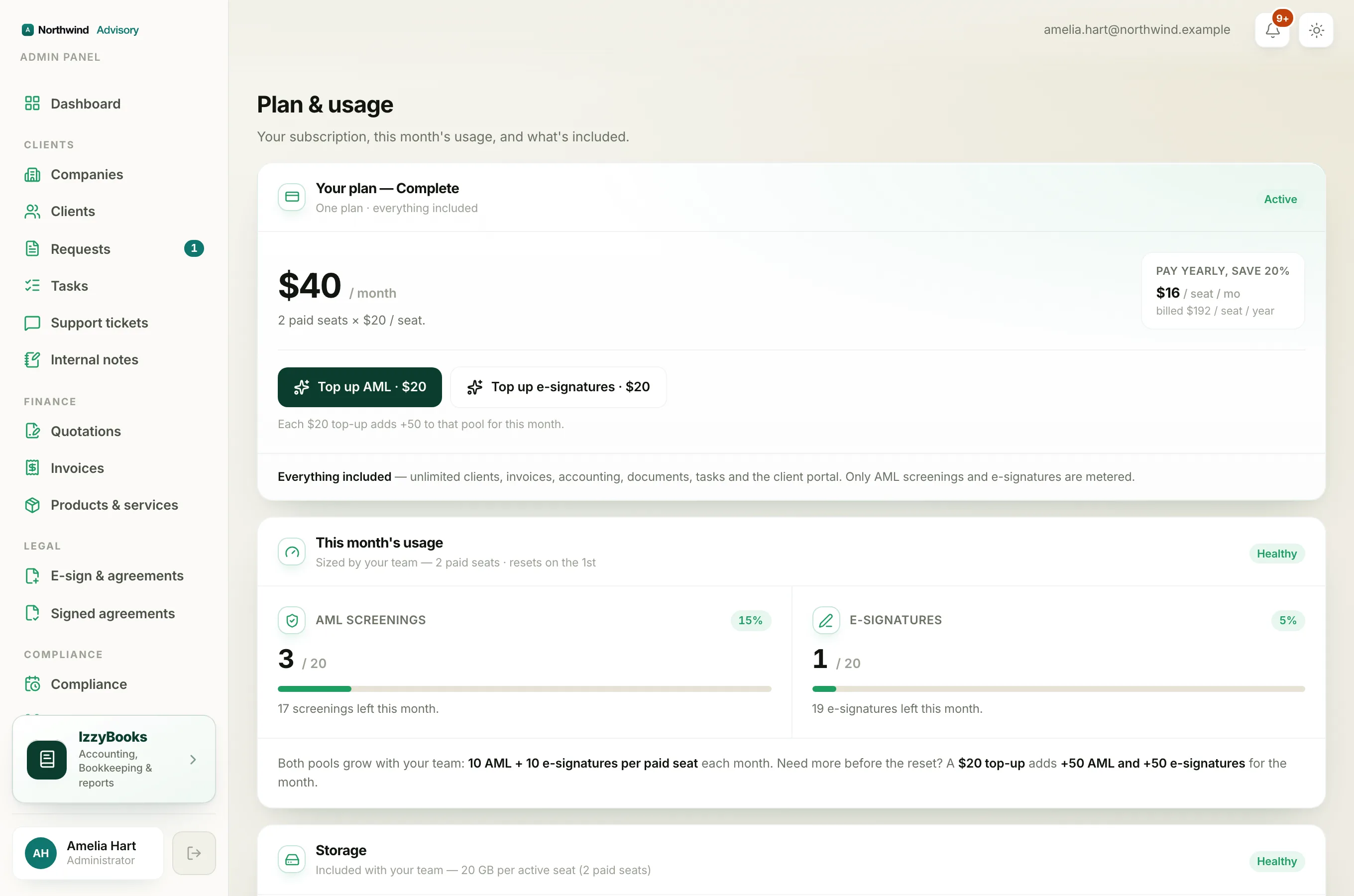
Each meter shows how many you have used, how many you have in total, and how many are left. Both reset on the first of every month.
How your monthly amounts are set
Your monthly amounts grow with your team. Every paid seat adds AML screenings and e-signatures to your pool each month, 10 of each on the full bundle. So a firm on the bundle with three paid seats gets 30 of each, every month. Add a seat and both pools grow. Your usage screen always shows your own exact numbers. See Buy or reduce staff seats.
Add more with a top-up
If you run low before the first of the month, you can buy a one-off top-up.
- On the Usage and top-ups page, or on the Subscription page under Add-ons, find the top-up for the pool you need.
- Click Buy for AML screenings or E-signatures.
- A $20 top-up adds 50 more to that pool for the current month.
The extra amount is credited straight away, so you can carry on at once. A top-up is a one-off. It does not change your monthly plan.
Note
Top-ups are added on top of your monthly amount and are used for the current month. Your normal monthly amount comes back on the first, as usual.
When a top-up is available
A top-up tops up a pool you already have, so two things must be true to buy one:
- The package must be in your plan. You can only top up AML screenings if your plan includes AML, and e-signatures if it includes e-signatures. If a package is not in your plan, the top-up asks you to add the package first. See Locked features and how to unlock a module.
- Your plan must be active. If your free trial has ended and you have not started a plan, top-ups pause with the rest of your paid features. Start a plan first, then you can buy a top-up. See What happens when your trial ends.
Document storage
Your plan also includes document storage, shown lower down the page. Every paid seat includes 20 GB, pooled across your firm for client files, KYC documents, signed agreements and invoices. Uploads are never blocked, even if you go over.
Need a lot more every month?
If you find yourself topping up often, it is usually cheaper to add seats or move to the full bundle, which raises your monthly amounts. See Choose or change your plan.